
Whispy AI: Cozy Chat
NEXBASE TECH PTE. LTD.Entertainment
2.7108.00 Reviews
- Version
- 1.7.1
- Installs
- 50.00K
- Age Rating
- Everyone
Screenshots

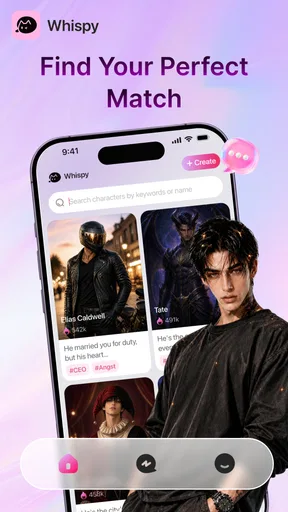
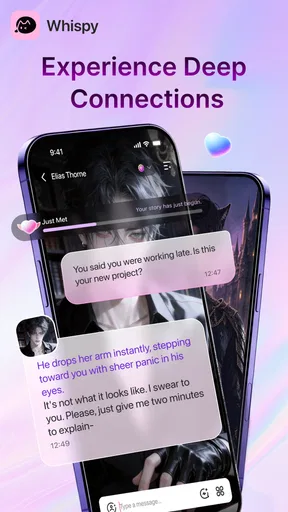
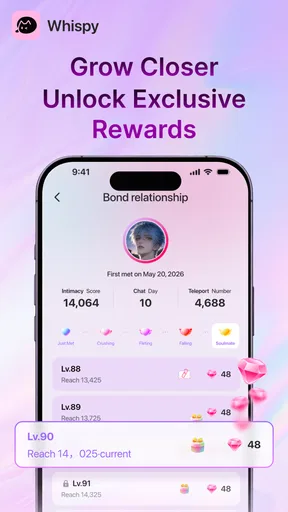
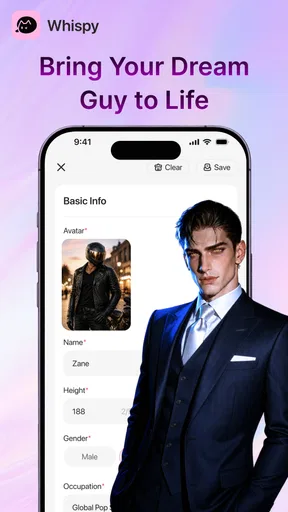


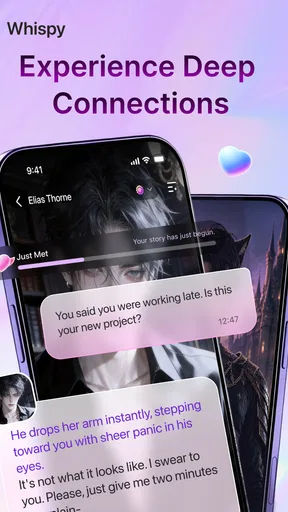
Our Review of Whispy AI: Cozy Chat
 Analysis by Appyee
I approached Whispy AI: Cozy Chat as something that might sit on a shared phone or tablet rather than as a serious productivity tool. Its appeal is easy to understand: you open an entertainment app, start a conversation, and use an AI companion for company, light conversation, or a bit of distraction. In my experience, that makes it most interesting in ordinary household moments, such as when one person is cooking and another wants something to do, or when a family tablet is passed around during a quiet evening.
The important distinction is that this is an AI companion app, not a replacement for messaging with relatives, a private journal, or a supervised service designed specifically for children. I found the conversational idea approachable, but shared-device use changes the questions I would ask before recommending it. Who is using the device? Can the next person see what was discussed? Is the conversation suitable for everyone who might pick up the phone? Those practical boundaries matter more here than the friendly presentation.
How Whispy AI fits into a shared household
When I think about Whispy AI on a household device, the useful question is not simply who can open it, but whether everyone understands that an AI chat can feel personal even when the screen is shared. I’d agree on a simple handoff routine—finish the conversation, close the app, and avoid leaving private details in view—before making it available to others. That makes it easier to decide whether shared access is comfortable at all.
A simple scenario where the app makes sense
Imagine a tablet on a living-room table. One household member uses it to chat for a few minutes after work, perhaps asking for a playful conversation or simply typing thoughts into an always-available companion. Later, someone else reaches for the same tablet. That sounds harmless, but the experience depends heavily on whether the first conversation remains visible and whether the second user understands that they are continuing an existing interaction rather than starting from a clean slate.
That is why I would treat Whispy AI as a personal-use app even when it is installed on a shared device. The device may belong to everyone, but the conversation can still feel personal. I would avoid handing it to a younger family member immediately after an adult has used it, especially if the previous discussion included private feelings, relationship problems, health concerns, or anything that another person should not casually read.
A better household routine is to agree on when the app is available and who uses it. For example, an adult might use it during a commute or in a private room, while the shared tablet remains reserved for general entertainment. That small separation prevents an AI conversation from becoming an accidental family display.
What the first session feels like
The store summary presents the app as a cozy AI companion, and that framing sets the right expectation. I would not install it expecting a structured course, a powerful planning system, or the breadth of a general-purpose assistant. Its value is in the conversational moment. You type, read the response, decide whether to continue, and shape the tone through your own messages.
That can be relaxing when I want low-pressure interaction. It can also feel limited if I arrive with a precise task and expect dependable, step-by-step results. Traditional search is usually better for checking a fact, a notes app is better for keeping a reliable record, and a normal messaging app is better when the real goal is contact with a person. Whispy AI occupies the softer space between those uses.
One practical tip is to begin with a clear purpose instead of typing random prompts for a long time. A short request such as wanting a calming chat, a creative exchange, or help thinking through an everyday decision gives the conversation direction. If the replies start feeling repetitive, changing the subject or stating the kind of response I want is more useful than continuing to ask the same question.
Keeping personal boundaries on a shared device
The biggest household issue is not installation; it is separation. Before using the app on a device that other people can access, I would check what remains visible after a conversation. I would also look at whether the app opens directly into the last exchange, whether notifications reveal message text, and whether another person can continue from the same screen. These are basic checks, but they are easy to overlook when an app feels casual.
I would not use a shared tablet for sensitive disclosures unless I had first established a private routine. An AI companion may feel nonjudgmental, yet that does not make the screen private. The safest approach is to avoid entering names, addresses, passwords, financial details, school information, or anything that would create a problem if another household member saw it.
This is also where account boundaries become important. Each person should use their own device or clearly separate personal sessions when possible. I would not encourage several family members to treat one visible conversation as a group diary. Shared jokes and harmless prompts are one thing; private emotional conversations are another.
Coordinating use without pretending it is a family tool
Whispy AI can be part of a household’s entertainment mix, but I would not mistake shared access for built-in family coordination. It is not the same as a family calendar, a group chat, or a task board where everyone can see agreed plans. If the household needs to coordinate chores, appointments, shopping, or school activities, a dedicated shared tool is the clearer choice.
Where it can help is in the preparation stage. I might use a conversation to brainstorm a movie-night theme, invent a few questions for a family game, or think through ways to make a quiet afternoon less dull. I would then move the final plan into the appropriate place, such as a message to the family or a written list. That separation is useful because the AI conversation is a brainstorming space, not automatically a trusted household record.
A less obvious advantage of this workflow is that it prevents the app from becoming the only place where an idea exists. If the conversation suggests something worth doing, I would copy the useful result into a shared note or tell the people involved. If the idea is not worth transferring, it was probably only entertainment, which is perfectly fine too.
Age context and trust
The app carries an Everyone content rating, which makes it easier to consider in a household with different ages. I still would not interpret that label as a promise that every generated reply will suit every child or every situation. AI conversations can be unpredictable, and a general age label does not replace an adult’s judgment about how a younger person should use a conversational service.
For a child using a shared device, I would prefer an adult to be nearby at least during the first sessions. The goal is not to turn casual entertainment into a formal lesson; it is simply to explain that the app generates responses, can misunderstand questions, and should not be treated as a secret-keeper or authority. A child should know to stop and ask an adult if a reply feels confusing, upsetting, or too personal.
I would give the same advice to older users who may be less familiar with AI. The friendly tone can make a conversation feel more human than it is. That warmth is part of the appeal, but it can also encourage over-trust. I found it healthier to enjoy the interaction while remembering that the app is producing text, not offering human friendship, professional counseling, or guaranteed truth.
Where it differs from familiar alternatives
Compared with ordinary entertainment apps, Whispy AI asks for more active participation. A video service can entertain me without any input, while this app depends on what I type and how I guide the exchange. That makes it more personal than passive viewing, but also less satisfying when I am tired and do not want to carry a conversation.
Compared with a standard chatbot used mainly for work, it feels better suited to relaxed conversation than to formal output. If I need a polished email, a carefully checked explanation, or a dependable research starting point, I would choose a tool built around those tasks. If I want a lighter interaction that gives me something to respond to, the companion format is more natural.
Compared with a human messaging app, the obvious trade-off is availability versus relationship. An AI can respond without waiting for a friend to become free, but it cannot provide the shared history, responsibility, or genuine care of a person who knows me. I would use Whispy AI to fill a brief gap, not to withdraw from real relationships.
Cost, device support, and what to watch during use
The app is free to install, which makes trying it straightforward. However, in-app purchases range from a small amount to several hundred dollars per item. That wide range is the main financial caution I would raise for a shared household. If children or guests can access the device, I would review the purchase safeguards before allowing unsupervised use and make sure everyone knows that free installation does not necessarily mean every part of the experience is free.
The current version is 1.7.1 and it supports Android 7.0 or later. That gives the app a broad potential device range, including older Android hardware, although actual comfort will still depend on the particular phone or tablet and how well it handles the app. On a shared device, I would also keep the operating system and app updated through the normal store process rather than relying on an old installation indefinitely.
The developer is NEXBASE TECH PTE. LTD., and the app sits in the entertainment category. It has passed fifty thousand installs, while its average rating is 2.7 from around 180 ratings and 108 written reviews. I see that rating as a reason to approach it with measured expectations rather than as an automatic rejection. A companion app is highly dependent on personal taste: one user may enjoy the tone, while another may find the replies too limited or the experience not worth continuing.
Small habits that improve the experience
My first useful habit would be to keep conversations narrow. Instead of mixing personal reflection, jokes, planning, and random questions in one long thread, I would start a fresh exchange when the purpose changes, if the app makes that possible in the way I expect on the device. This makes the interaction easier to follow and reduces the chance that an old topic influences a new one.
Second, I would treat generated suggestions as prompts rather than instructions. If the app helps me think of a family activity, I would still check whether it suits the available time, budget, and people involved. If it offers advice about a personal problem, I would compare that advice with my own judgment and, when the subject is serious, speak to a trusted person or qualified professional.
Third, I would establish a clear stopping point. AI chat can encourage endless back-and-forth because each reply invites another message. In a household setting, a short timer or a simple rule such as “use it for one conversation, then return the device” keeps the app from quietly taking over shared screen time. This is especially useful when the same tablet is needed for homework, calls, or another person’s entertainment.
Who should use it and who should skip it
I think Whispy AI is best for someone who enjoys experimenting with conversational entertainment and wants a low-pressure digital companion on an individual device. It may suit a person who likes imaginative prompts, casual reflection, or a little company during a quiet break. The free entry point also makes it reasonable to test before deciding whether the style matches your expectations.
I would be more cautious recommending it to someone who wants a private emotional outlet, a dependable source of important information, or a shared family communication hub. It is also a poor fit for anyone who dislikes typing, expects every answer to be precise, or wants a completely passive form of entertainment. A video app, podcast service, notes tool, or human conversation may serve those needs better.
For families, my recommendation is conditional: use it as an optional entertainment app with clear device and privacy boundaries, not as a child-care substitute or a household memory bank. Adults should explain the difference between friendly wording and genuine understanding, and they should keep purchase controls and personal conversations in mind.
My household verdict
Whispy AI: Cozy Chat has a clear, approachable idea, and I can see why an AI companion would appeal to people who want something more interactive than scrolling. Its strongest use is a short, personal conversation that adds a little warmth or creativity to an otherwise ordinary moment. It works best when I choose the topic, keep my expectations realistic, and remember that the app is entertainment rather than a human relationship.
My hesitation comes from shared-device ambiguity and the need for sensible trust boundaries. The Everyone rating helps place it in a broad entertainment context, but it does not remove the need for supervision or privacy awareness. The possible purchase range also deserves attention before several people use the same device. Those are not reasons to avoid the app entirely; they are reasons to decide who should use it and under what conditions.
Overall, I would try it on a personal Android device and recommend it selectively to adults or families willing to manage shared access carefully. I would skip it as a replacement for messaging, professional advice, or coordinated household tools. If you want a cozy conversational distraction and are comfortable treating AI responses as generated entertainment, it is worth exploring. If privacy, predictable answers, or family-wide organization come first, another type of app will be the better choice.
Verdict
Strengths of Whispy AI: Cozy Chat
- Warm, low-pressure conversations suit users seeking casual emotional support.
- Simple chat-focused design is easy to navigate on smaller phone screens.
- AI replies are available anytime without scheduling or waiting for another person.
- Cozy presentation creates a calmer alternative to more productivity-focused AI apps.
- Useful for brainstorming thoughts or practicing how to express feelings.
Limitations of Whispy AI: Cozy Chat
- AI empathy can feel repetitive or shallow during complex personal situations.
- It should not be treated as a substitute for professional mental-health support.
- Privacy details deserve careful review before sharing sensitive personal information.
- Long conversations may become less consistent as the AI loses earlier context.
- Some features or usage limits may depend on in-app purchases or subscriptions.
Similar Picks in This Category
View All
Google Play Games
Google LLC3.9

Netflix
Netflix, Inc.4.8

YouTube Kids
Google LLC4.2

Disney+
Disney4.4

Prime Video
Amazon Mobile LLC4.7

Steam
Valve Corporation3.2
Frequently Asked Questions
What is Whispy AI: Cozy Chat and what can I use it for?
Whispy AI: Cozy Chat is designed as a relaxed, conversational AI experience where users can chat, ask questions, explore ideas, or simply enjoy casual company. Its cozy presentation makes it feel less like a traditional productivity assistant and more like a friendly conversation space. You can use it for brainstorming, entertainment, writing help, general advice, or open-ended conversations, although its responses should not replace professional medical, legal, or financial guidance.
Does Whispy AI: Cozy Chat require an internet connection?
Yes, you should expect to need an active internet connection for most of the app’s main features. AI conversations are generally processed through online services, so chat availability and response speed may depend on your connection quality and the service’s server status. If you are traveling or using mobile data, it is worth checking your data plan, since extended conversations may consume more data than a simple offline utility app.
Is Whispy AI: Cozy Chat free to download and use?
The app may be available to download without an upfront charge, but some features, conversation limits, premium characters, or extended usage can depend on the current subscription or in-app purchase model. Pricing and included benefits can change over time, so review the store listing and the payment screen carefully before confirming anything. Also check whether a free trial automatically converts into a paid subscription.
Are conversations in Whispy AI: Cozy Chat private and secure?
You should avoid treating any AI chat as a completely private diary. Conversations may be sent to online servers to generate replies, and the app may collect certain technical or usage information according to its privacy policy. Before sharing personal details, passwords, financial information, health records, or identifying documents, read the developer’s privacy terms and understand how chats are stored, reviewed, or deleted.
Is Whispy AI: Cozy Chat suitable for children and sensitive users?
Suitability depends on the age rating, content controls, and the type of conversations the AI can generate. AI responses are not always perfectly predictable, and the app may occasionally provide inaccurate, unsuitable, or emotionally confusing answers. Parents should review the store rating, available safety settings, and privacy practices before allowing a child to use it. Younger users should also be reminded not to share personal information with the chatbot.
